Design DynamoDB to stay in the always-free tier
Fit a multi-tenant task tracker inside DynamoDB's 25 free read and write capacity units, with the cost of each access pattern and when on-demand wins.

On this page
Amazon DynamoDB has an always-free tier, but it only covers provisioned capacity, so the DynamoDB free tier question of provisioned vs on-demand decides whether you pay anything at all. We built a small multi-tenant task tracker on one table and one global secondary index (GSI), sized to fit in the free 25 read and 25 write capacity units. Then we measured what every access pattern costs.
This article is for developers who use DynamoDB and want a design that costs $0 on purpose, not by luck. You get the capacity math, a worked budget for a real app, the traps we hit, and a tested AWS Cloud Development Kit (CDK) repo.
Key takeaways
- The free tier covers 25 read capacity units (RCU) and 25 write capacity units (WCU) of provisioned capacity per Region. On-demand requests get nothing free.
- Every provisioned table and GSI in the Region draws from the same 25 units. Budget them like money.
- A GSI pays for its own writes. Keep fast-changing attributes out of its keys and project only what the query shows.
- Measure each access pattern with
ReturnConsumedCapacity. Our unit tests missed a read that cost double. - Pick on-demand when your peaks pass 25 units and your average traffic is low.
| At a glance | |
|---|---|
| Level | Intermediate |
| Time to read | 11 minutes |
| Cost | $0 for capacity and up to 25 GB of storage. Auto scaling alarms can cost $0.10 each past 10 |
| Code | InfraTales/dynamodb-always-free-design |
| Tested with | AWS CDK 2, DynamoDB Local 3.3.2, 67 automated tests, cdk-nag |
DynamoDB free tier: provisioned vs on-demand
The pricing page lists the free tier "on a per Region, per-payer account basis": 25 WCUs, 25 RCUs, 25 GB of storage and 2.5 million stream reads a month. One more line decides the design. The same page limits the allowance to provisioned capacity and the Standard table class.
So on-demand reads and writes get no free allowance, and neither does storage in the Standard-Infrequent Access (IA) table class. The AWS Price List API meters the allowance as 18,600 unit-hours a month, which is 25 units running for a 31-day month.
This allowance is always free, so it applies on both the Free and Paid plans. Keep in mind that a new account on the Free plan closes on its own after 6 months, or sooner if its credits run out, unless you upgrade. On the Paid plan the 25 units stay free.
The allowance belongs to the Region, not to a table. If you already run one provisioned table with 10 WCU in us-east-1, a new table there has 15 WCU left before the bill starts. Each table and each GSI needs at least 1 RCU and 1 WCU.
The capacity math you budget with
Every budget starts from a few rules in the DynamoDB Developer Guide. We coded them into a calculator in src/capacity.ts:
| Operation | What it costs |
|---|---|
| Read up to 4 KB | 0.5 RCU by default (eventually consistent), 1 with ConsistentRead: true, 2 in a transaction |
| Write up to 1 KB | 1 WCU, 2 in a transaction |
Query |
Adds up every item it reads, then rounds up to 4 KB once. Filters don't lower it |
Scan |
Pays for every item it reads, not the ones it returns |
BatchGetItem |
Rounds each item up to 4 KB on its own |
| Write that touches a GSI | The GSI pays its own WCU, sized by the index entry. A key change costs 2 |
Item size drives all of it. An item's size is its attribute names plus values, so long attribute names cost capacity too. A 650-byte task fits in one write unit. Add 400 more characters of description and it crosses 1 KB, and every write of it now costs 2.
The GSI rule surprises people most. If a GSI can't keep up with its writes, DynamoDB throttles writes to the table too.
One table and one GSI for tasks
Our app has projects, tasks and an activity log, all in one table. Every key starts with the tenant ID, so one tenant's query can't return another tenant's items. Tasks and their activity share a partition, which makes "list a project" and "recent activity" one Query each.
The GSI answers "my open tasks". We made three choices that keep it cheap:
export function taskIndexKeys(task) {
  if (!task.assignee || task.status === 'DONE') return {}; // sparse: finished tasks leave the index
  return {
    gsi1pk: `TENANT#${task.tenantId}#USER#${task.assignee}`,
    gsi1sk: `DUE#${task.due ?? NO_DUE_DATE}#${task.taskId}`, // status is not in the key
  };
}
Notice that status stays out of the index key. Starting a task changes nothing in the index, so it costs 0 index writes instead of 2. The index also projects only title and due. An index entry is 150 bytes instead of 650, so 20 of them fit in one 4 KB block. That makes "my open tasks" cost 0.5 RCU, where projecting all attributes would cost 2.
A worked budget for the free 25 units
We wrote down a peak workload for a team tool with a few hundred people using it during the day. Here is each access pattern, priced from item sizes:
| Access pattern | Per second | Table cost | GSI cost |
|---|---|---|---|
Open a task (GetItem) |
12 | 0.5 RCU | 0 |
List a project, 30 tasks (Query) |
2 | 2.5 RCU | 0 |
My open tasks, 20 (Query on GSI) |
6 | 0 | 0.5 RCU |
| List projects, recent activity | 2 each | 0.5 RCU | 0 |
| Create a task | 1 | 1 WCU | 1 WCU |
| Start a task | 2 | 1 WCU | 0 |
| Finish a task (leaves the index) | 1 | 1 WCU | 1 WCU |
| Reassign a task (index key change) | 0.5 | 1 WCU | 2 WCU |
| Record activity | 4.5 | 1 WCU | 0 |
| Create a project | 0.1 | 1 WCU | 0 |
Multiply rate by cost and you get the peak demand. The table needs 13 RCU and 9.1 WCU, and the GSI needs 3 of each. The plan splits the free 25 like this:
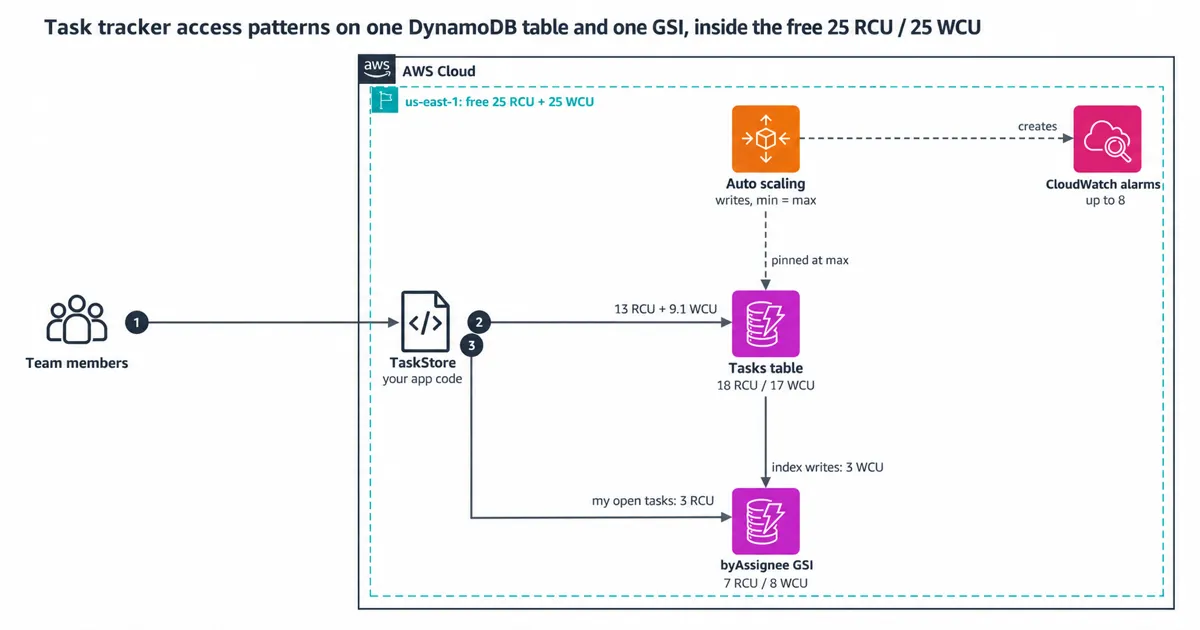
The table gets 18 RCU and 17 WCU. The GSI gets the remaining 7 RCU and 8 WCU. The CDK stack refuses to synthesize if the totals pass 25, and npm run budget fails if the workload stops fitting.
Measure every access pattern
A budget built from item sizes is only a guess until you check it. Ask DynamoDB for the capacity a call used, and it tells you at no charge. Our data layer asks every time:
const out = await this.client.send(new QueryCommand({
  TableName: this.tableName,
  IndexName: 'byAssignee',
  KeyConditionExpression: 'gsi1pk = :pk',
  ExpressionAttributeValues: { ':pk': assigneePartition(tenantId, userId) },
  Limit: 20,
  ReturnConsumedCapacity: 'INDEXES', // per table and per index, not only the total
}));
this.report('listMyOpenTasks', out.ConsumedCapacity);
INDEXES splits the number between the table and each GSI, which is what a budget needs. The integration tests run every pattern against DynamoDB Local and check each measured cost twice: against the design number and against the calculator.
Can you trust DynamoDB Local's numbers? AWS's docs say Local ignores provisioned throughput, and they say nothing about consumed capacity. In our tests, Local agreed with the documented rules in every case we tried: all 11 patterns, plus a Scan, a filtered query, a transaction and the 1 KB boundary. It doesn't throttle, so it can't test throttling.
What we got wrong first
Our first test layer was the calculator and the budget. Both passed, so we broke things on purpose to see what they caught. We changed "open a task" to a strong read with ConsistentRead: true. All 40 unit and template tests still passed.
The unit tests compare the design numbers with the calculator, and neither one sees the flags on a real request. Only the DynamoDB Local test caught it: the read measured 1 RCU instead of 0.5. At 12 reads a second, that one flag adds 6 RCU, and the table would need 19 of its 18.
We ran nine of these breaks in total, including a GSI that projects all attributes and a higher auto scaling maximum. Each one now fails at least one test. Four of them fail only against the real engine, among them the strong read and a finished task that stayed in the index.
Auto scaling, throttling and TTL
Provisioned capacity is a hard ceiling on cost. Once traffic passes it, DynamoDB throttles the request and the AWS SDK retries it, so you get slower responses, and errors once the retries run out, instead of a bill. DynamoDB also keeps up to 300 seconds of unused capacity as burst capacity, though AWS says it may use some for maintenance.
Auto scaling needs care inside the free tier. CDK's TableV2 only accepts auto scaled write capacity, so we pinned the minimum to the maximum. Scaling down saves nothing when the capacity is free anyway, and it leaves less unused capacity to burst from. Your bill depends on the maximum, and auto scaling stays at or below it.
Auto scaling also creates CloudWatch alarms. AWS's docs say it creates four for each scaled dimension, so our two scaled write dimensions can use 8 of the 10 free alarm metrics. We kept read capacity fixed to stay under that.
Activity items carry a TTL attribute 30 days out. DynamoDB deletes expired items "without consuming write throughput", but only "within a few days" of expiry. Until then they still come back from queries and still cost reads, so the query filters them out.
What it costs
These are us-east-1 prices from the AWS Price List API, checked on 2026-10-15:
| Item | Free each month | After that |
|---|---|---|
| Provisioned writes | 25 WCU | $0.00065 per WCU-hour (about $0.47 per WCU-month) |
| Provisioned reads | 25 RCU | $0.00013 per RCU-hour (about $0.09 per RCU-month) |
| Storage, Standard class | 25 GB | $0.25 per GB-month |
| On-demand requests | None | $0.625 per million writes, $0.125 per million reads |
| Point-in-time recovery | None | $0.20 per GB-month |
At full use, the free capacity is worth $14.51 a month. We left point-in-time recovery off to stay at $0. It costs $0.20 per GB-month, so turn it on in the stack once the data is worth that.
When this isn't the right fit
On-demand bills per request with nothing free, yet it's sometimes the better deal:
- Spiky traffic. An import every night of 100,000 small items takes over an hour of throttled retries at 25 WCU. On-demand finishes it for $0.0625 a run. You can also set a maximum throughput on an on-demand table as a cost ceiling, which AWS applies on a best-effort basis.
- Many tables. Each table and GSI needs at least 1 RCU and 1 WCU, so a design with many indexes runs out of free units fast.
- Unknown load. Our peak workload would cost about $6.06 a month on-demand if it ran 8 hours each workday. That's a fair price for not having to guess.
You can switch a table from on-demand to provisioned at any time. You can go the other way up to four times in a rolling 24-hour window. AWS raised that limit from once a day in August 2025.
Try it yourself
The repo runs without an AWS account. Run npm run check first: it type-checks, lints, runs the calculator and template tests, and then synthesizes the stack with cdk-nag. Start DynamoDB Local on port 8013 and run npm run test:int to measure every access pattern yourself.
To fit your own app, change the rates in src/workload.ts and run npm run budget. Then npm run deploy creates the table and nothing else.
Clean up
The table has deletion protection and a retain policy, so npm run destroy leaves it in place. Turn off deletion protection and delete it when you're sure. Then check CloudWatch for leftover auto scaling alarms, because deleting a table doesn't remove them.
Have you measured your most expensive access pattern yet? Run it with ReturnConsumedCapacity and tell us what it cost.
Sources
Pages were read on 2026-10-28.
AWS pricing pages
- Amazon DynamoDB pricing: Free tier per Region, per-payer account: 25 WCU, 25 RCU, 25 GB, 2.5 million stream reads, provisioned and Standard class only; us-east-1 provisioned, on-demand, storage and PITR rates
- Amazon CloudWatch Pricing: 10 free alarm metrics, $0.10 per standard resolution alarm metric per month
AWS documentation
- Choosing a plan: Free plan ends after six months or when credits run out and the account closes unless upgraded; always-free services on both plans
- DynamoDB read and write operations: Read and write unit costs, Query rounds the summed size to 4 KB, Scan charges for evaluated items, BatchGetItem rounds each item
- Using Global Secondary Indexes in DynamoDB: GSI writes consume index WCU, an index key change costs two writes, short GSI write capacity throttles table writes
- Managing throughput capacity automatically with DynamoDB auto scaling: Four CloudWatch alarms per read or write scaling dimension; alarms are not deleted with the table
- Using time to live (TTL) in DynamoDB: Expired items deleted within a few days of expiry without consuming write throughput
AWS announcements
- Amazon DynamoDB now supports more frequent throughput mode updates from provisioned to on-demand capacity: Aug 13, 2025: provisioned to on-demand up to four times in a rolling 24 hours, previously once
This article first appeared on AWS Builder Center. The code is on GitHub at InfraTales/dynamodb-always-free-design.
Next step
Have the same problem on your stack?
Send the architecture, AWS bill concern, deploy pain, or GenAI reliability issue. I'll find the first real bottleneck and propose a small, reversible fix.
FAQ
Is there a free tier for DynamoDB on-demand?
No. The always-free allowance is 25 read and 25 write capacity units of provisioned capacity per Region, on the Standard table class. On-demand reads and writes get no free allowance, and every provisioned table and GSI in the Region shares the same 25 units.
How do you measure what a DynamoDB query costs?
Set ReturnConsumedCapacity on each call. DynamoDB reports the capacity it used at no charge, and INDEXES splits it between the table and each GSI. In this repo, only the DynamoDB Local test caught a strong read that measured 1 RCU instead of 0.5.
When is on-demand the better choice?
On-demand wins for spiky traffic, for designs with many tables or indexes, and for unknown load. An import every night of 100,000 small items takes over an hour of throttled retries at 25 WCU, but costs $0.0625 a run on-demand.
Related reading

Rahul Ladumor
Principal Cloud & AI Platform Architect. AWS Professional certified, 5x AWS Community Builder. I work with teams that have real users, real AWS bills, and real production pressure.
About Rahul →