AWS CDK security as code: IAM, VPC, KMS, WAFv2 and Security Hub in one stack
AWS CDK security as code in one TypeScript stack: KMS keys, least-privilege IAM, VPC endpoints for secrets, WAFv2 and Security Hub, all versioned and reviewed.
On this page
When your AWS security controls are console clicks, they drift. When they are AWS Cloud Development Kit (AWS CDK) constructs, they have version history, code review and tests. This walkthrough is for senior engineers and platform teams who write CDK in TypeScript and want to go past "enable Security Hub and call it done". You get one stack that wires AWS Key Management Service (AWS KMS), AWS Identity and Access Management (IAM), Amazon Virtual Private Cloud (Amazon VPC) endpoints, AWS WAF (WAFv2) and AWS Security Hub together, the failure modes to plan for, and a decision matrix for where VPC endpoints stop saving money and NAT wins.
Who this is for
A common starting point: a security audit comes back with findings, and at least half of them are for resources nobody remembers creating. This is for senior engineers and platform teams who already know what AWS security controls exist and are trying to figure out how to enforce them without trusting that humans will remember to check boxes.
If you have never touched CDK, this will be hard going. If you are comfortable with CDK TypeScript and want to move from "we have Security Hub enabled" to "our security posture is versioned code with tests", you are the audience.
How security drift starts in the console
Security drift starts small. Someone needs to test something in production for five minutes, so they open the console, create an Amazon Simple Storage Service (Amazon S3) bucket, set it public "just for now", and forget about it.
Six months later your audit flags it. Nobody knows why it exists. The person who created it has left the company. You have 14 findings like this.
The usual response is to tell people to be more careful. That depends on memory, and memory is what failed. Security as code in AWS CDK survives at scale because every control carries its own history and review.
The architecture itself is the easy part: six building blocks and a set of controls. The harder part is the operational detail: what breaks when a customer managed key (CMK) is scheduled for deletion, how Security Hub floods you with findings on day one, and where VPC endpoints pay for themselves. Most of this article is about that detail.
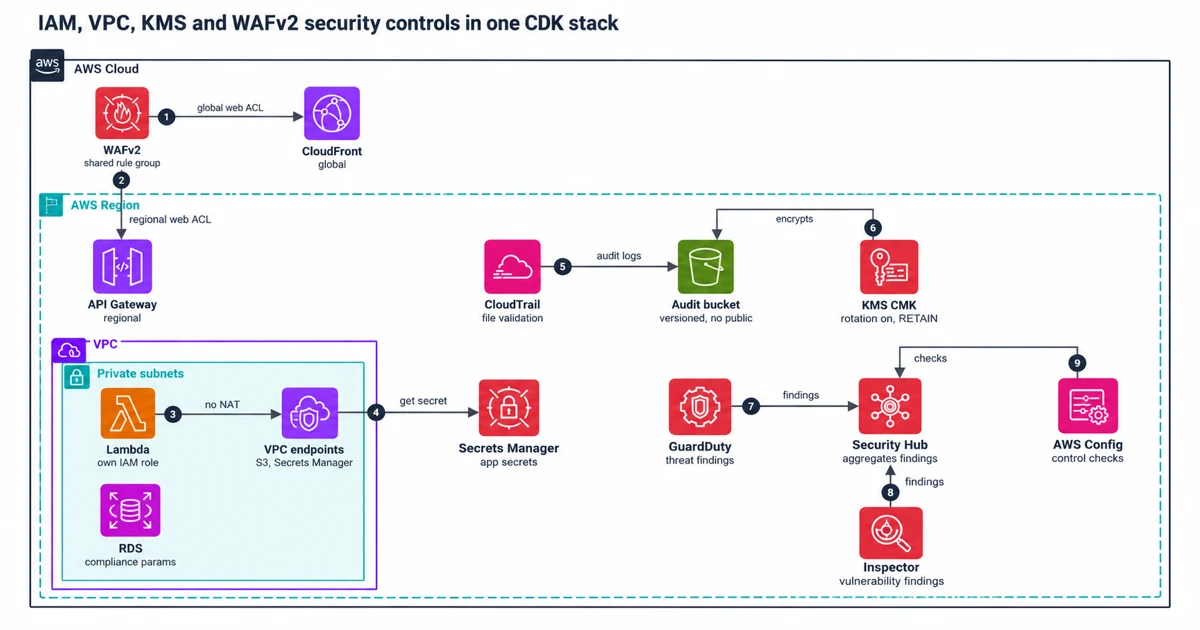
The architecture wires together six things that usually get set up independently and then drift apart:
- KMS-encrypted S3 with AWS CloudTrail.
- A segmented VPC with VPC endpoints for credential fetching.
- WAFv2 on both Amazon CloudFront and Amazon API Gateway.
- Amazon Relational Database Service (Amazon RDS) with compliance-locked parameter groups.
- Least-privilege IAM roles for AWS Lambda functions.
- Security Hub aggregating findings from Amazon GuardDuty and Amazon Inspector, with AWS Config running its control checks.
All six live in one CDK TypeScript stack.
The non-obvious decision is routing AWS Secrets Manager and AWS Systems Manager Parameter Store access through VPC endpoints instead of a NAT gateway. Your Lambda functions live in private subnets. Without the endpoint, fetching a secret means traversing NAT to the public internet and back. With the endpoint, it stays inside the AWS network.
It sounds obvious. Many stacks still skip it, because nobody traces where those API calls go until the NAT bill makes them look.
Build the VPC, KMS and IAM layers in CDK
The walkthrough goes layer by layer, with the decisions that matter in each.
The VPC layer first. Public subnets get the NAT Gateway and load balancers. Private subnets get Lambda, RDS, and nothing else reachable from outside. VPC endpoints sit in the private subnets for S3 and Secrets Manager.
Secrets Manager API calls without an endpoint go through NAT. At scale, with dozens of Lambda functions fetching secrets on cold start, those calls add up on your NAT bill and they traverse the public internet for no reason. It usually surfaces late, when someone traces where the NAT costs come from, months after the fact.
If you are trying to work out whether VPC endpoints beat NAT on cost, the endpoint cost math in the S3, EventBridge and Lambda cost breakdown is worth reading first. Short version: for S3, the gateway endpoint wins at any volume. For Secrets Manager it depends on traffic, as the break-even below shows. For third-party API calls, NAT has no substitute.
The KMS layer. The audit S3 bucket, the CloudTrail log group, the RDS instance and the CloudTrail trail use a CMK instead of an AWS managed key. With a CMK you write the key policy, you can restrict who decrypts, and you get an audit trail per key.
The trade-off: every Lambda cold start that decrypts makes a KMS API call. At $0.03 per 10,000 requests, plus $1/month per key and 20,000 free requests/month (KMS pricing, checked 2026-10-18), this shows up in your cost report once you have high-traffic Lambda functions.
This CDK snippet creates the CMK, an encrypted CloudTrail log group, the audit bucket and the trail:
import * as cdk from 'aws-cdk-lib';
import * as s3 from 'aws-cdk-lib/aws-s3';
import * as kms from 'aws-cdk-lib/aws-kms';
import * as cloudtrail from 'aws-cdk-lib/aws-cloudtrail';
import * as logs from 'aws-cdk-lib/aws-logs';
import { Construct } from 'constructs';

export class SecurityStack extends cdk.Stack {
 constructor(scope: Construct, id: string, props?: cdk.StackProps) {
 super(scope, id, props);

 // CMK with rotation enabled
 const trailKey = new kms.Key(this, 'TrailKey', {
 enableKeyRotation: true,
 description: 'CMK for CloudTrail and S3 audit logs',
 removalPolicy: cdk.RemovalPolicy.RETAIN, // never let CDK delete this
 });

 // CloudTrail log group - encrypted, retention pinned
 // THIS is what most teams miss in audits
 const trailLogGroup = new logs.LogGroup(this, 'TrailLogGroup', {
 encryptionKey: trailKey,
 retention: logs.RetentionDays.ONE_YEAR,
 removalPolicy: cdk.RemovalPolicy.RETAIN,
 });

 // Audit bucket - block all public access, versioning on
 const auditBucket = new s3.Bucket(this, 'AuditBucket', {
 encryptionKey: trailKey,
 encryption: s3.BucketEncryption.KMS,
 blockPublicAccess: s3.BlockPublicAccess.BLOCK_ALL,
 versioned: true,
 enforceSSL: true,
 removalPolicy: cdk.RemovalPolicy.RETAIN,
 });

 // CloudTrail with log integrity validation
 const trail = new cloudtrail.Trail(this, 'AuditTrail', {
 bucket: auditBucket,
 cloudWatchLogGroup: trailLogGroup,
 enableFileValidation: true, // the config flag people set but never validate against
 encryptionKey: trailKey,
 sendToCloudWatchLogs: true,
 });
 }
}
See removalPolicy: cdk.RemovalPolicy.RETAIN on the CMK. The L2 kms.Key already defaults to RETAIN, so this line changes nothing today. I set it anyway: a reviewer sees the intent without looking up the default, and the protection is in the diff if someone later flips it to DESTROY. Remove a key from a CloudFormation stack without a retain policy and KMS schedules it for deletion.
If your CloudTrail logs are encrypted with that key and the key disappears, the logs cannot be recovered. This is the first setting I check on any security stack review.
Also notice enableFileValidation: true on the trail. Validation is enabled, which is good, but all it does is deliver signed digest files. CloudTrail does not validate them for you, so nothing raises an alarm when a log file is changed or deleted. You find out by running aws cloudtrail validate-logs, or your own validator, against the digests. Schedule that check, or it is decoration.
The IAM layer. No wildcard principals anywhere. Every Lambda function gets its own IAM role, scoped to exactly the actions it needs.
In CDK that means creating the role explicitly rather than letting the Lambda construct auto-create it, because auto-created roles accumulate permissions as people add things and nobody removes the old ones. For IAM patterns that scale across many functions without turning into copy-paste, a small role factory that takes the actions and resource ARNs per function works better than hand-written policies.
Choose CMKs or AWS managed keys, and endpoints or NAT
The first decision is whether to use CMKs everywhere or mix CMKs and AWS managed keys. This is how I compare them:
| Control | CMK | AWS-managed key | Console (please don't) |
|---|---|---|---|
| Key policy control | Yes, you write it | No, AWS owns it | N/A |
| Cross-account decrypt | Possible | Not possible | N/A |
| Audit trail per key | CloudTrail per operation | CloudTrail per operation | No trail |
| Cost per 10k requests | $0.03 | No monthly key fee; requests can be billed past the free tier | Free |
| Rotation control | You set schedule | AWS handles it | N/A |
| Accidental deletion risk | High (7-30 day wait) | Low | High |
My recommendation: a CMK for anything with compliance requirements (CloudTrail, RDS, audit S3 buckets), and AWS managed keys for everything else. Do not put a CMK on your Lambda deployment package bucket, because the cost and complexity are not justified. This balance is easy to get wrong, so I would settle it per resource before the first deploy.
For VPC endpoints versus NAT, count gigabytes, not API calls, because NAT data processing is billed per GB ($0.045/GB in us-east-1). For S3, use a gateway endpoint: it has no hourly or data charge, so it beats NAT at any volume. An interface endpoint for Secrets Manager costs $0.01/hr/AZ, about $7.30/month/AZ, plus $0.01/GB, so each GB it takes off NAT saves $0.035 and it breaks even near 210 GB per AZ a month. Secrets Manager responses are small, so most stacks never reach that from secret fetches alone. The case for that endpoint is keeping the traffic private, or removing NAT altogether.
What breaks: key deletion, WAF drift, NAT bills and finding noise
The KMS deletion scenario is the one that keeps me up. The mandatory waiting period for CMK deletion is 7 to 30 days. If someone runs cdk destroy on a stack whose key is set to RemovalPolicy.DESTROY, KMS schedules the key for deletion.
Your encrypted S3 buckets, CloudTrail logs, and RDS snapshots are still there, but unreadable, because the key is pending deletion. You get no alert unless you built one: a CloudWatch alarm on a metric filter over your CloudTrail logs, for ScheduleKeyDeletion calls or for the "is pending deletion" error that AWS's own alarm recipe matches. Most teams have not.
WAFv2 drift is easy to miss. When you deploy WAF rules on CloudFront (global, us-east-1) and on API Gateway (regional, your region), you are managing two separate WebACLs. Update CloudFront for a new threat and forget API Gateway, or the reverse, and you have inconsistent protection. One rule group cannot serve both, because a rule group has a scope like a web ACL: CloudFront needs a CLOUDFRONT rule group in us-east-1, and API Gateway needs a REGIONAL one in its Region. Define the rules once in a CDK construct and create one rule group per scope from it, and you still need a deployment process that makes sure both get updated together.
The NAT gateway surprise bill follows a common pattern. A Lambda function with a retry bug or a misconfigured VPC route starts hammering NAT. No throughput alarm fires, and no spend alert.
The bill that month is, say, $1,200 instead of $80 (illustrative, but the shape is real). A NAT gateway has no built-in throttle and no "you are spending way more than usual" alarm. You wire that yourself.
Security Hub on day one generates hundreds of findings, most of them informational. The CIS AWS Foundations Benchmark alone flags things like "MFA not enabled on root account" (valid) alongside "CloudTrail not enabled in ap-northeast-3" (you do not operate there). Without suppression rules pre-built, your team spends the first week triaging noise instead of fixing real issues. CloudWatch metric filters on the CloudTrail log group cut through some of it.
Alarms and reviews to set up on day one
A few things I would put in the runbook from day one.
Set a CloudWatch alarm on KMS key deletion: a metric filter on the CloudTrail log group for ScheduleKeyDeletion calls, plus AWS's recipe that matches the "is pending deletion" error. This is a five-minute CDK task that prevents the worst case above. Do it.
Set a NAT gateway outbound-bytes alarm. If BytesOutToDestination exceeds, say, 50GB in a day, page someone. It costs almost nothing, and it flags a surprise bill within a day instead of at month end.
Wire Security Hub findings to an Amazon Simple Notification Service (Amazon SNS) topic with a Lambda function that auto-suppresses known informational findings. Keep it to suppression: auto-remediation is a separate conversation with real blast radius. Suppress the noise so the team sees real findings. Without this, Security Hub becomes a dashboard nobody trusts after week two.
Review VPC endpoint policies quarterly. The endpoint policy controls which principals in your account can use the endpoint. An overly permissive policy allowing "Principal": "*" means any Lambda in the account, not just your app, can use your private S3 endpoint. Scope it to the specific IAM roles that need it.
When you split this monolithic stack, and eventually you will, the dependency ordering is what matters. Short version: KMS keys before buckets, buckets before CloudTrail, VPC before Lambdas, Lambdas before WAF associations. Get that wrong in a nested stack setup and you spend a day debugging CREATE_FAILED on a resource that depends on something that does not exist yet.
When to split the stack, and what to get right first
My view: the monolithic stack is fine to start. It gives you atomic deployments and no cross-stack ordering headaches. The moment more than one team touches it, or you run more than two environments, split it into at least a foundation stack (KMS, VPC, IAM roles) and an application stack.
Get these controls right before anything else, in this order:
- CMK retention set to RETAIN.
- VPC endpoints for Secrets Manager and S3 in private subnets.
- Security Hub suppression rules written before you enable all standards.
You can iterate on everything else. Also enable a NAT gateway spend alarm before you deploy, so the alarm reaches you before the bill does.
Sources
Pages were read on 2026-10-18 unless noted.
AWS pricing pages
- AWS Key Management Service pricing: per-key, per-request and free-tier KMS charges.
- AWS PrivateLink pricing: interface VPC endpoint hourly cost per AZ, and $0.01 per GB processed for the first PB (per-GB rate read 2026-10-27).
- Amazon VPC pricing: NAT gateway $0.045 per hour and $0.045 per GB processed in us-east-1 (read 2026-10-27).
Other AWS documentation
- Deleting AWS KMS keys: the 7 to 30 day deletion waiting period.
- Rotating AWS KMS keys: automatic annual rotation for customer-managed symmetric keys.
- Validating CloudTrail log file integrity: enabling validation delivers digest files but does not validate the log files; you validate with the AWS CLI or your own solution (read again 2026-10-27).
- Validating CloudTrail log file integrity with the AWS CLI: the
validate-logscommand (read 2026-10-27). - CreateWebACL: WAFv2 Scope CLOUDFRONT (must use us-east-1) versus REGIONAL for API Gateway.
- CreateRuleGroup: a rule group is also created with Scope CLOUDFRONT or REGIONAL (read 2026-10-27).
- Resources that you can protect with AWS WAF: a web ACL and the rule groups it uses must be in the Region of the protected resource, which is us-east-1 for CloudFront (read 2026-10-27).
- Gateway endpoints: no additional charge for S3 and DynamoDB gateway endpoints (read 2026-10-27).
- Control access to VPC endpoints using endpoint policies: endpoint policy principals and the default full-access policy.
- What is AWS Security Hub CSPM?: finding aggregation from GuardDuty and Inspector, CIS support, and AWS Config as the control engine.
- NAT gateway CloudWatch metrics: the NAT gateway byte metrics, including BytesOutToDestination.
Next step
Have the same problem on your stack?
Send the architecture, AWS bill concern, deploy pain, or GenAI reliability issue. I'll find the first real bottleneck and propose a small, reversible fix.
FAQ
Does the AWS CDK kms.Key construct retain the key by default?
Yes. The L2 kms.Key construct already defaults to RemovalPolicy.RETAIN, so setting it explicitly changes nothing today. Setting it anyway shows the intent in review and puts the protection in the diff if someone later flips it to DESTROY.
What happens to encrypted data when a KMS key is scheduled for deletion?
KMS deletion has a mandatory waiting period of 7 to 30 days. While the key is pending deletion, encrypted S3 buckets, CloudTrail logs and RDS snapshots are still there but unreadable. You get no alert unless you build one, such as a CloudWatch alarm on a metric filter over your CloudTrail logs for ScheduleKeyDeletion calls.
Should Lambda in a private subnet use a VPC endpoint or NAT gateway for Secrets Manager?
Route Secrets Manager and Parameter Store calls through VPC endpoints, so fetching a secret stays inside the AWS network instead of going through NAT to the public internet. An interface endpoint costs $0.01 per hour per AZ, about $7.30 a month per AZ. For third-party API calls, NAT has no substitute.
Do CloudFront and API Gateway need separate AWS WAF web ACLs?
Yes. WAF rules on CloudFront are global and deployed in us-east-1, while API Gateway uses regional rules in your Region, so you manage two separate web ACLs. Use a deployment process that updates both together, or one of them drifts.
How do I reduce AWS Security Hub noise after enabling it?
Security Hub generates hundreds of findings on day one, most of them informational. Write suppression rules before you enable all standards, and send findings to an SNS topic with a Lambda function that auto-suppresses known informational findings, without auto-remediating.
Related reading

Rahul Ladumor
Principal Cloud & AI Platform Architect. AWS Professional certified, 5x AWS Community Builder. I work with teams that have real users, real AWS bills, and real production pressure.
About Rahul →